Clock in at the lawn.
Press Play Grass Cutting Game, click inside the player and press Enter. On a phone, tap the title screen. Use WASD or the arrow keys to drive on a computer, or drag your finger to steer on a touchscreen.
Free browser play. A fresh start.
One more
patch.
Mow the lawn. Keep it green.
A little yard with a lot going on.
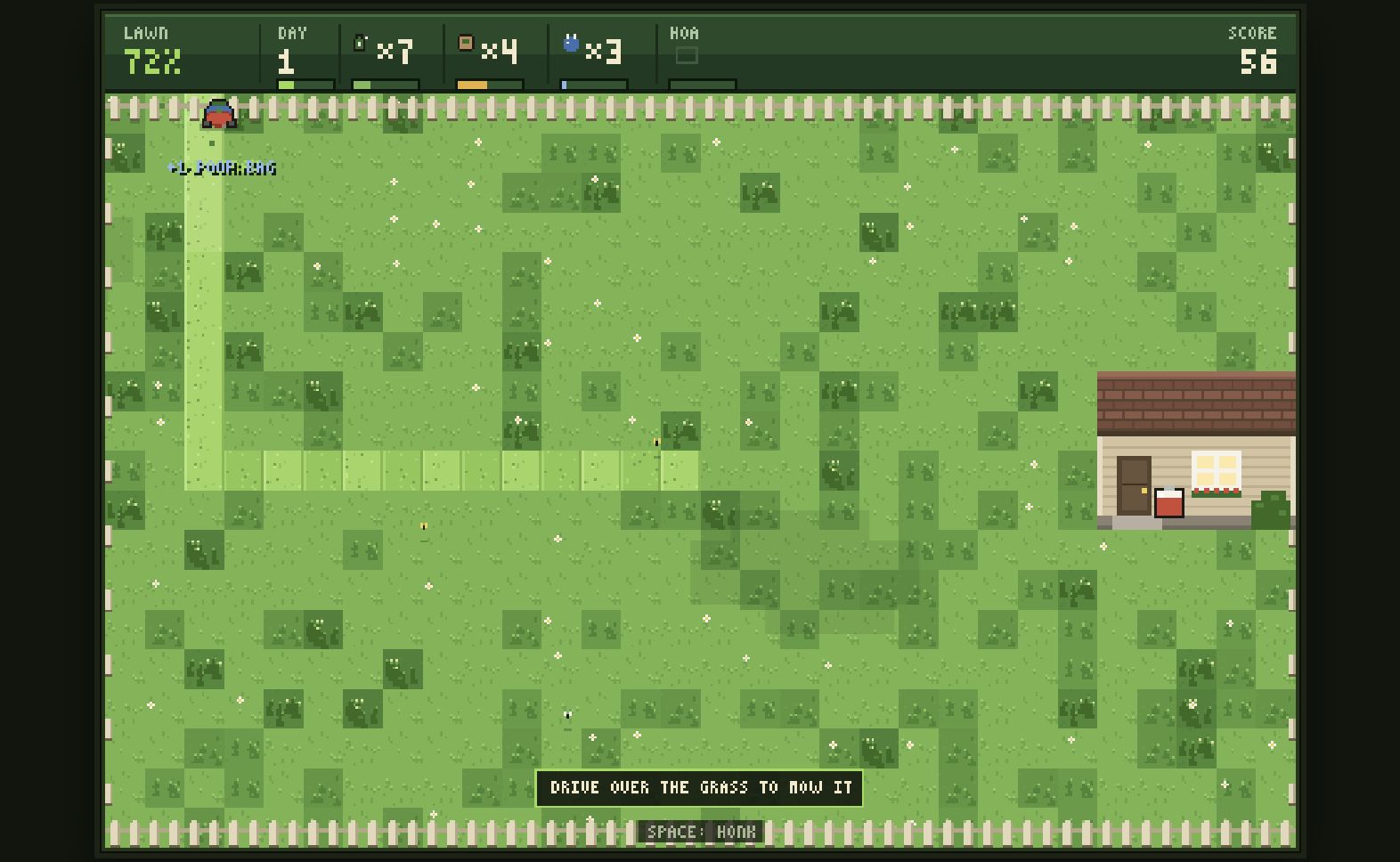 ACTUAL GAMEPLAY
Loading Grass Cutting Game. Your lawn will appear right here.
Quick start: Click inside the game and press Enter, then use WASD or arrow keys. On a phone, tap to start and drag to steer. See the field notes ↓
One mower, a lively backyard, and a clear path behind you. Play Grass Cutting Game, a pixel grass cutting game about keeping a lawn healthy for as long as you can.
Drive through tall grass to cut it, earn points and replenish lawn-care supplies. Weeds spread, squirrels dig holes and a neighborhood dog can leave a mess. The next job is always nearby, and the grass keeps growing while you work.
This version is hosted here and contains no advertisements. There is no download or account to create. Changing seasons and local high scores give your next run a target.
Press Play Grass Cutting Game, click inside the player and press Enter. On a phone, tap the title screen. Use WASD or the arrow keys to drive on a computer, or drag your finger to steer on a touchscreen.
Drive over tall grass to cut it and score points. Mowing replenishes supplies for lawn care, and taller grass pays more. Follow overlapping rows so small uncut patches do not get left behind.
Move close to a weed, hole or mess and press Space, or tap on a phone, to perform the matching action. Keep lawn health above 40%: below it, the HOA complaint meter rises. One complaint letter ends the run.
FROM THE FIRST FIELDStart with a few short passes near the middle of the yard. The grass changes appearance after you mow it, so use those cleared strips to plan your next row. Overlap slightly at the edges rather than leaving thin patches behind.
Keep an eye on the lawn-health percentage and the supplies at the top. Cutting grass earns resources, but weeds, holes and mess can still damage the yard. Approach a problem and use Space or tap to deal with it before returning to your mowing route.
Health below 40% starts filling the HOA complaint meter. A letter ends the run, so recovering the lawn matters more than chasing one distant patch. Seasons change as you survive; winter replaces mowing with snow clearing.
Press P to pause on a computer, or tap the top status strip on a phone. Use the site’s Fullscreen button when you want a larger player. Your best scores stay in this browser, giving you a target for the next attempt.
Press the orange Play button to load the game in this page. A small mowing animation appears in the same space, then the game's own start screen takes over. There is no app to install and no Grass Cutting Game account to create. The first load needs an internet connection and may take longer than later visits.
Grass Cutting Game uses keyboard controls on computers and a touch joystick on phones. The touch version has a taller yard, so portrait orientation is a useful starting point. Fullscreen gives the game more room; availability depends on your browser. The game draws its own pixel artwork in a browser canvas.
Let the initial download finish, then click inside the player so it receives your input. If the game stays blank, reload the page once and try again on a stable connection. Make sure JavaScript is enabled and click inside the player before pressing Enter. You can also try another current browser; reinstalling an app is not necessary.
This site hosts the game files. Grass Cutting Game keeps the top five scores and tutorial hints in local browser storage; it does not save an active run as a campaign. Clearing site data or using private browsing can remove these records. Scores do not synchronize between devices.
The short answers to the things players ask about this grass cutting game.
Yes. This site hosts an ad-free version of Grass Cutting Game. There are no video ads, rewarded-ad offers, entry fees or account requirements.
On a computer, click inside the game, press Enter to start and use WASD or the arrow keys. On a touchscreen, tap to start and drag to steer. Desktop mouse dragging is not a driving control.
Yes. Grass Cutting Game includes touch controls and a taller lawn for phones. Drag to drive, tap for a nearby action, and tap the top status strip to pause. Portrait orientation gives the lawn the most room.
No app is required. Press Play Grass Cutting Game to load the game here. The first load needs an internet connection and JavaScript enabled in your browser.
Space performs a nearby action such as spraying a weed, filling a hole, bagging a mess or honking at an animal. On a phone, tap to act; a second finger can perform an action while you steer.
The game stores your top five scores and tutorial hints in this browser. An active run is not a saved campaign and does not transfer to another device. Clearing site data removes those local records.
On a computer, press P to pause or resume and M to toggle sound. On a phone, tap the top status strip to pause and tap again to resume.
Use the Fullscreen button below the player. Press Escape on a computer to leave fullscreen. Availability and screen orientation depend on your mobile browser.
Grass Cutting Game is a pixel lawn-care arcade game hosted on this website. It is adapted from an open-source game; see our Copyright page for the original source and license details.
Reload the page and try a current browser with JavaScript enabled. If the game appears but does not respond, click inside the player before using the keyboard. Report your browser, device and the screen you reached through Contact.
How did your first field go?
Share a useful tip, your best mowing route, or where you got stuck. Keep personal details and links out of comments.
The fence is quiet. Be the first to leave a field note.